Claude Code Hooks: Enforcing Verification, Not Requesting It
Claude Code hooks are shell commands the CLI runs by itself at fixed points in a session: before a tool call, after one, when you submit a prompt, when an agent tries to stop. You configure them in settings, they receive a JSON payload on stdin, and their exit code can block whatever was about to happen. That last property is the entire reason they matter, and it makes them the highest-leverage part of my agentic coding setup: about 200 lines of bash across three files, one of which decides whether an agent may end its turn. Everything here is checked against Anthropic’s hooks reference, the one place these semantics are defined.
Anthropic’s own best-practices page puts the distinction in one sentence: “Unlike CLAUDE.md instructions which are advisory, hooks are deterministic and guarantee the action happens.”
Why exit code 2 is the whole point
Everything you write in a context file is a request. The model reads it, weighs it against the rest of the context, and complies most of the time. That is fine for style preferences and useless for verification, because the failure mode is silent: the agent reports success, the test suite never ran, and you find out later.
A hook is not a request. It is a process the harness runs, and its exit code is control flow:
0means proceed. On most events the output the script wrote to stdout is shown to you in the transcript; on a few, UserPromptSubmit and SessionStart among them, it is added to the model’s context instead. That carve-out is the whole reason those two events are worth wiring.2means block, and what it blocks is defined per event, not globally.1, or any other non-zero code, is a non-blocking error: the failure is surfaced and the run continues.
Exit code 2 is the only one of the three that changes the agent’s behaviour, and the effect differs event by event. On Stop and SubagentStop it blocks the turn from ending and feeds the hook’s stderr back to the model, so the agent sees the failure and has to deal with it. On PreToolUse it blocks the tool call before it runs, which makes it a permission decision taken in code rather than a permission prompt taken at you. On UserPromptSubmit it blocks prompt processing: the prompt is erased and the stderr goes to you, not to the model. On SessionStart and SubagentStart nothing is blocked at all, the message is rendered as a notice and the session proceeds. Read the reference for the event you are wiring before you rely on a blocking exit. The design doc for my setup states the consequence in one line: “Exit 2 blocks the Stop, so the agent must fix a red check before it can end its turn — verification is enforced, not requested.”
The best-practices page names the problem this solves, that a model has no independent signal for doneness: “Claude stops when the work looks done. Without a check it can run, ‘looks done’ is the only signal available, and you become the verification loop.”
The two hooks I actually run
I run exactly two Claude Code hooks, both global: one configuration, wired once in ~/.claude/settings.json and shared by every project on the machine.
| Hook | Event | Matcher | Blocks? |
|---|---|---|---|
format-file.sh |
PostToolUse | Edit|Write |
never, always exits 0 |
check-project.sh |
Stop, SubagentStop | none | yes, exit 2 on a red check |
The format hook fires after any Edit or Write tool call and auto-formats the file it touched. The check hook fires when an agent tries to end its turn, and runs the repository’s own .claude/check.sh. Both are generic runners: the repo-specific behaviour lives in a template script inside the repo, so the global configuration never needs per-project editing.
Here is the Stop entry, exactly as it sits in the settings file. SubagentStop carries an identical entry; PostToolUse adds "matcher": "Edit|Write":
"Stop": [
  {
    "hooks": [
      {
        "type": "command",
        "command": "~/.claude/hooks/check-project.sh"
      }
    ]
  }
]
The failure policy of the two hooks is deliberately asymmetric. The formatter can never block anything. The check hook blocks hard, but it is opt-in: in a repository with no .claude/check.sh it is a complete no-op. The rationale is one line in my design doc: “Formatting can fall back safely; running the wrong test suite cannot.” Guessing wrong about ruff format costs nothing. Guessing wrong about the test command blocks every turn on something that was never going to pass, and costs the agent’s trust in the gate.
Inside the check hook: the decision chain
A Stop hook running the test suite on every single turn is unusable, so most of the script is about deciding not to run. The precise rule is that the check runs on every Stop unless one of five skip conditions holds: this stop was already blocked once this turn, the directory is not a git repository, the tree is clean and pushed, the fingerprint is unchanged since the last pass, or the repository has no .claude/check.sh. Each branch below exits 0, blocks nothing and allows the stop:
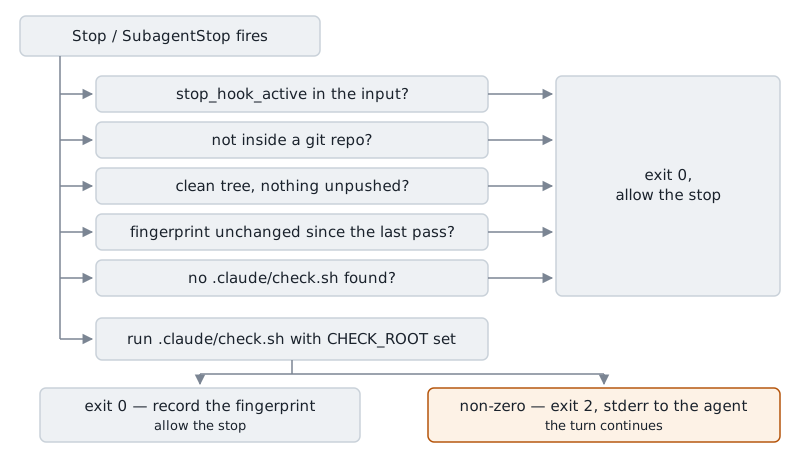
The first branch is the loop guard. The input data on stdin sets stop_hook_active to true when this stop was already blocked once, so a second block would spin forever.
The third branch is what keeps read-only agents free. A reviewer that only read files, a researcher, a subagent that changed no files: clean tree, no unpushed commits, nothing to check. “Unpushed” is measured against the branch’s upstream, falling back to the first of origin/main and main that exists, since a clone off a side branch has no local main. When no base resolves at all, the script assumes the worst rather than disappearing. An unresolvable base means “assume there is work”, and the comment says why: “the gate is never skipped just because nothing could be compared against.” A gate that silently stops gating is worse than no gate.
Untracked changes under .claude/ count as dirty on purpose, so a first-ever or edited check.sh always reaches the fingerprint test at least once.
The tree fingerprint, and why it is captured early
The fingerprint is the branch that makes this bearable. It hashes five pieces of data through git hash-object: HEAD, the porcelain status, the unstaged diff, the staged diff, and the content of every untracked file that is not ignored. An identical fingerprint means nothing happened since the last passing run, so the check is skipped.
The result goes in a marker file in that same cache directory, keyed by a hash of the repo root, written only when the check passes. A failing check records nothing, so it runs again next turn.
The ordering took a bug to learn, and the fix is a comment in the script: the fingerprint is “Captured once, before check.sh runs, so a formatter or a concurrent process mutating the tree mid-run can’t get recorded as passing a state it never actually checked.” Hash after the run instead, and a formatter that rewrites a file mid-suite hands you a cached pass for a tree nothing verified.
Every invocation appends one line per decision to claude-check/trace.log under $XDG_CACHE_HOME, falling back to ~/.cache. Each line carries four fields: the time, the pid, the working directory and the branch taken, for example skip: unchanged since last pass or RUN check root=.... Only the opening start line adds the event and the project directory, read from CLAUDE_HOOK_EVENT and CLAUDE_PROJECT_DIR and printed as ? when unset, which they often are: CLAUDE_PROJECT_DIR is the documented variable of the two, and the event name arrives reliably on stdin rather than in the environment. “Why did the check not run?” is a question you will ask within a week, and without the trace log it is unanswerable.
Worktrees need one more piece. A worktree shares .git with the main checkout but not untracked files, and .claude/check.sh is untracked by design, so a fresh worktree has no copy. A shared lib.sh resolves this: it walks up looking for the nearest .claude/<name>, else falls back to the main checkout’s copy, always the first entry of git worktree list. The script then runs with CHECK_ROOT set to the worktree’s top level, so the template lints and tests the tree the agent is actually in.
Writing a check.sh: seconds-fast, per repo
The template takes no arguments, honours the CHECK_ROOT env var, and exits non-zero on any failure, which is what the hook turns into a block. Lint, typecheck, unit tests. Nothing else. Two examples, one per stack:
#!/usr/bin/env bash
set -e
cd "${CHECK_ROOT:-$(dirname "$0")/..}"

# Python repo
uv run ruff check .
uv run mypy src/
uv run pytest -x -q tests/unit

# Node repo
npm run lint
npx tsc --noEmit
npx vitest run --bail=1
Keep the half you need, chmod +x .claude/check.sh, done. The whole setup per project is one executable file.
The binding constraint is time. This script gates every agent stop, several times a minute in a busy session, and my doc is blunt about it: “The check template gates every agent stop, so it must be seconds-fast — full CI stays in CI.” pytest -x and --bail are there for the same reason: the agent needs the first real failure, not every one. Integration suites, container builds and deploys stay in CI, where a two-minute wait costs nothing.
Hook events and the input each one receives
The two I use are a small slice of a surface that keeps growing: the reference documents well over twenty events. The table below is not that list. It is the events this setup uses plus the ones you meet first, and the complete set is in the hooks reference.
| Event | Fires when | Effect of exit 2 |
|---|---|---|
| PreToolUse | before a tool call runs | blocks the tool call |
| PostToolUse | after a tool call completed | message back to the model, the call already ran |
| UserPromptSubmit | on prompt submission | erases the prompt, stderr goes to the user |
| Stop | the main agent tries to end its turn | blocks the stop |
| SubagentStop | a subagent, spawned through the agent tool for one task, ends its turn | blocks the stop |
| SessionStart | a session starts or resumes | nothing blocked, rendered as a notice |
| Notification | Claude Code raises a notification | nothing blocked |
Claude Code hooks cover the rest of the lifecycle too: PostToolUseFailure and PermissionRequest around tool calls, SubagentStart, TaskCompleted and TeammateIdle around delegated work, PreCompact and PostCompact around compaction, plus SessionEnd, ConfigChange, Elicitation and the worktree events. Check the reference for the one you want rather than assuming a list like this is complete.
Every hook receives one JSON object as input on stdin. Five input fields are on every event; the rest are specific to the event that fired.
| Input field | Present on | What it carries |
|---|---|---|
session_id |
every event | the session the hook input came from |
transcript_path |
every event | file path to that session’s transcript |
cwd |
every event | working directory when the hook fired |
permission_mode |
every event | the session’s current permission mode |
hook_event_name |
every event | which event produced this input |
tool_name |
tool events | the tool being called |
tool_input |
tool events | the call’s arguments, for example the file_path of a Write |
tool_response |
PostToolUse | what the tool returned |
prompt |
UserPromptSubmit | the text you just submitted |
message |
Notification | the notification text |
stop_hook_active |
Stop, SubagentStop | true when this stop was already blocked once |
The hook_event_name field lets one script serve several events. My check hook is wired to both Stop and SubagentStop and does not care which one fired. A script that does care branches on that field instead of on an env var.
For tool events, tool_input is the interesting field: the argument object of a call that has not run yet. A PreToolUse hook can read the command of a Bash call, or the file_path of a Write, and exit 2 on anything it does not like. That is a permission layer with real teeth, instead of a paragraph in a context file that asks nicely.
Parse the input object with whatever is already on the machine: jq if you have it, a one-line interpreter call otherwise. My check hook, for example, reads exactly one input field with a python3 -c on stdin and ignores the rest of the input.
PreToolUse and PostToolUse entries carry a matcher, a regex that has to match the full tool name. Edit|Write matches both file-writing tools, Bash matches shell commands, and mcp__.* matches every call into an MCP server. A matcher naming a specific MCP tool is the only place you get to see that tool’s arguments before they leave the machine. Events with no tool involved take no matcher.
SessionStart and Notification cannot block anything. SessionStart is the natural place to auto-inject context that changes per session, current branch or open issues, for the stdout carve-out described above. Notification hands you the message text, which people wire to a desktop alert. I use neither yet.
What this does not solve
Claude Code hooks prove a check ran and passed on a specific state of the tree. They say nothing about whether the check is any good, and an agent with write tools can edit check.sh like any other file in the repo. The compensating control is not technical: the check template is part of the diff a separate reviewer agent reads, and a weakened check is a review finding like the rest.
The bigger gap is that I have no measurement of what any of this buys. The trace log is one line per decision, not aggregate data, so if you ask how often the gate caught a failing check, or which changes it caught it on, I have no answer. That ledger is the next thing I owe this setup.
FAQ
Does Claude Code have hooks?
Yes. Claude Code hooks are user-defined shell commands configured in JSON, and the CLI runs them at lifecycle events: around tool calls (PreToolUse, PostToolUse), around prompts (UserPromptSubmit), around turns (Stop, SubagentStop) and around sessions (SessionStart, SessionEnd), among more than twenty documented in the hooks reference. Each hook receives an input object on stdin describing the session and, for tool events, the tool name and its arguments.
What are the best hooks in Claude Code?
The Stop and SubagentStop pair is the one with real leverage, because exiting 2 blocks the agent’s turn and feeds the failure back for it to fix. A PostToolUse hook whose matcher is Edit|Write, formatting the files it touched, is the useful second. Make the formatter always exit 0 and the check hook opt-in per project: a wrong guess about a test command is far more expensive than a wrong guess about a formatter.
How do I set up hooks in Claude Code?
Add a hooks block to ~/.claude/settings.json for global hooks, or to a project’s .claude/settings.json for project-specific ones. Each event name maps to a list of entries, each with an optional matcher and one or more commands of "type": "command". Project hooks run in addition to the global ones, so a repo can add its own without touching your machine-level configuration.
What does exit code 2 do in a Claude Code hook?
Exit code 2 is the blocking exit code, but what it blocks and who reads the stderr are defined per event. On Stop and SubagentStop it blocks the agent from ending its turn and the stderr goes back into the model’s context; on PreToolUse it blocks the tool call; on UserPromptSubmit it erases the prompt and the stderr is shown to you instead of the model; on SessionStart it blocks nothing. Exit 0 proceeds and exit 1 is a non-blocking error, so a hook that returns 1 on a red check gates nothing.
Sources
- Hooks reference — Anthropic, n.d.
- Best practices for Claude Code — Anthropic, 2025
- Settings files and precedence — Anthropic, n.d.
- Create custom subagents — Anthropic, n.d.